
 Interferometers
 Time-Tagger
 Quantum Physics Kits
Low Cost Time-to-Digital Converter
 The new quTAG LC in a compact design.
- Overview
- Coding Examples
- Downloads
quTAG LC – Low Cost Variant
The quTAG LC is a low-budget time tagger with one start and four stop channels. It has a RMS timing jitter of < 10 ps, typically 5 ps.
It includes 4 output channels, 4 marker inputs, and clock input and output.
The two QSL (Qutools Serial Link) ports allow the streaming of pulse sequences and patterns for external devices. They also can be used to synchronize and control qutools devices like additional quTAGs or educational devices such as quEDU.
Optional Features
| Available Features | |
|---|---|
| + Output Channels | |
 The 4 programmable outputs enable conditional measurements, state preparation, gating of detectors, control of shutters and more to synchronize events. The 4 programmable outputs enable conditional measurements, state preparation, gating of detectors, control of shutters and more to synchronize events. |
|
| + Clock Input | |
|
The quTAG can be synchronized to an external clock to allow more precise long-term accuracy.
|
|
| + Clock Output | |
|
The quTAG can synchronize external devices or further quTAGs to allow more precise long-term accuracy.
|
|
| + Virtual Channels & Filters | |
|
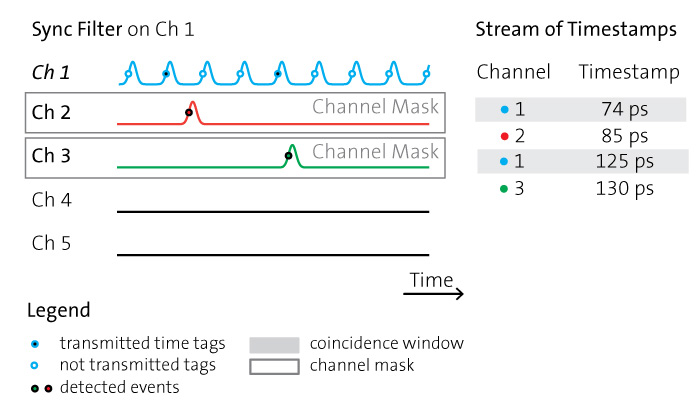
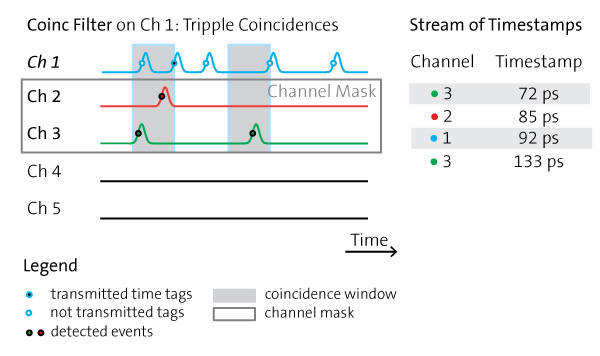
The device allows to enable virtual channels or userdefined filters. The filtering is based on hardware and happens inside the device to save USB bandwidth.
|
|
| + Marker Inputs | |
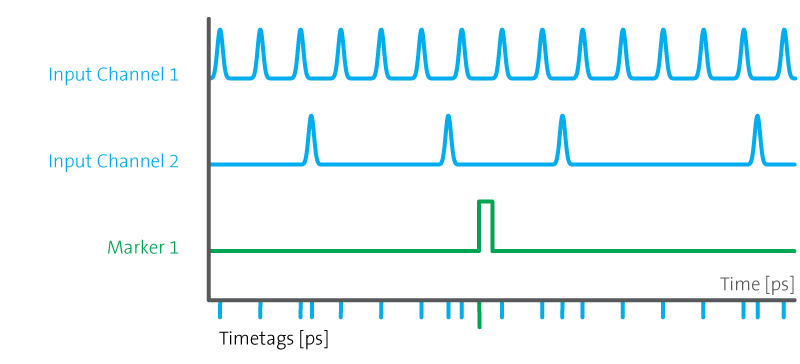 The device features 4 marker inputs, inserting low-res timestamps in the timeline. The device features 4 marker inputs, inserting low-res timestamps in the timeline.Marker inputs are needed e.g. to read a pixel or line clock in a FLIM setup. |
|
| + Synchronization of Devices | |
|
The two QSL (Qutools Serial Link) ports allow the streaming of pulse sequences and patterns for external devices.
They also can be used to synchronize and control qutools devices like additional quTAGs or educational devices such as quEDU. |
|
Overview of quick and easy Python Coding Examples
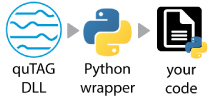
Python is a popular coding language for labs and institutes. Therefore, qutools created a Python file to wrap all the DLL or SO (Win/Linux) functions to gain quick and easy control of the hardware, download here.
The following list shows some examples using this wrapper. An explanation is added to each code.
- Retrieve Countrates and Coincidences
- Live Plotting of Countrates with matplotlib
- Create and retrieve a histogram of two channels
- Live Plotting of the histogram with a changing channel delay
- Retrieve timestamps
- Write timestamps to a file on the PC
- Change different settings of the quTAG
First Coding Example: How to retrieve Countrates
The following codes show how to quickly connect to the quTAG via Python. The quTAG.py file wraps all DLL functions to get simple access via your own code.
In the first example qutag-GetCoincCounter-starter_example.py we are retrieving countrates and coincidences of the quTAG and its input channels.
# Author: qutools GmbH
# Last edited: Sep 2025
#
# Tested with Windows 11 (64bit), python 3.11.9 (64bit)
#
# This is demo code. Use at your own risk. No warranties.
#
# It may be used and modified with no restriction; raw copies as well as
# modified versions may be distributed without limitation.

# for sleep
import time

# This code shows how to get event rates and coincidences from a quTAG connected via USB.

# Import the python wrapper which wraps the DLL functions.
# The wrapper should be in the same directory like this code in the folder '..\QUTAG-V1.5.0\userlib\src'.
try:
    import QuTAG_LC
except:
    print("Time Tagger wrapper QuTAG_LC.py is not in the search path.")

# Initialize the quTAG device
qutag = QuTAG_LC.QuTAG()

time.sleep(1)

# Set the exposure time (or integration time) of the internal coincidence counters in milliseconds, range = 0...65535
qutag.setExposureTime(100) # 100 ms exposure time

qutag.setCoincidenceWindow(2000)

# Give some time to accumulate data
time.sleep(1) # 1 second sleep time with 100ms exposure time would give ~10 times data we don't get

# device type
print("getDeviceType: ", qutag.getDeviceType())

# channel count
print("getChannelCount: ", qutag.getChannelCount())

# Now let's retrieve the most recent values of the built-in coincidence counters from quTAG.
# The array contains count rates for all 5 channels and rates for coincidences of events detected on different channels.
# Events are coincident if they happen within the coincidence window (qutag.setCoincidenceWindow).
# The coincidence counters are not accumulated, i.e. the counter values for the last exposure are returned.
data, updates = qutag.getCoincCounters()

# updates   Output: Number of data updates by the device since the last call.
# data      Output: Counter Values. The array must have at least 16 elements.
# The Counters come in the following channel order with single counts and coincidences.

CoincCounter_names = [
    '0(Start)', '1', '2', '3', '4',
    '1/2', '1/3', '2/3', '1/4',
    '2/4', '3/4', '1/2/3',
    '1/2/4', '1/3/4',
    '2/3/4', '1/2/3/4'
]

# Let's print the collected count rates and coincidence rates
print("Channel/Coincidence : Counts ")
for i in range(len(CoincCounter_names)):
    print(CoincCounter_names[i], ": ", data[i])

# Disconnects a connected device and stops the internal event loop.
qutag.deInitialize()
Datasheet & Manuals
| quTAG LC datasheet | 09/2025 | 0.2 MB | |
| quTAG LC quickstart manual V1.0.0 | 07/2025 | 0.2 MB |
Software quTAG LC
| quTAG software installer V0.2.6 – 32 bit | 07/2026 | 28.1 MB | exe |
| quTAG Daisy & DLL V0.2.6 – 32 bit | 07/2026 | 28.8 MB | zip |
| quTAG Daisy & DLL V0.2.6 – 64 bit | 07/2026 | 28.6 MB | zip |
| quTAG software linux V0.2.6 – 64 bit | 07/2026 | 5.5 MB | tgz |
| Python examples for quTAG LC | 07/2026 | 2.9 MB | zip |